
Stories Life: Kids World Game
SUBARAEducational
4.757.00 Reviews
- Version
- 1.22
- Installs
- 100.00K
- Age Rating
- Everyone
Screenshots
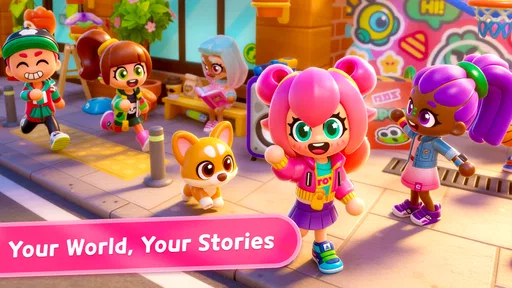

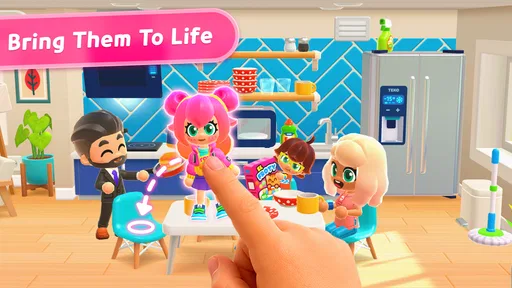
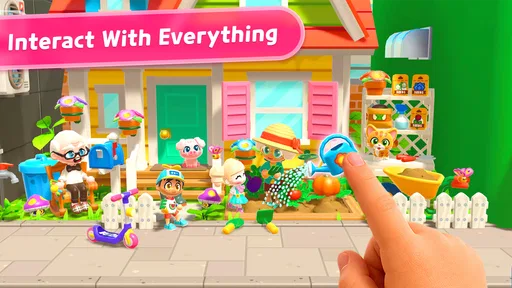
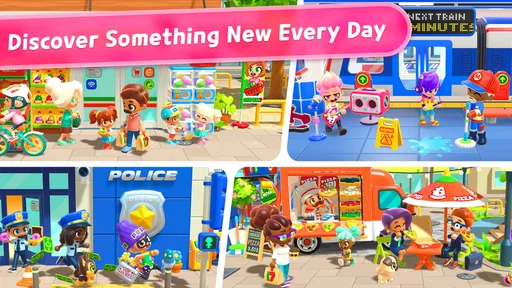
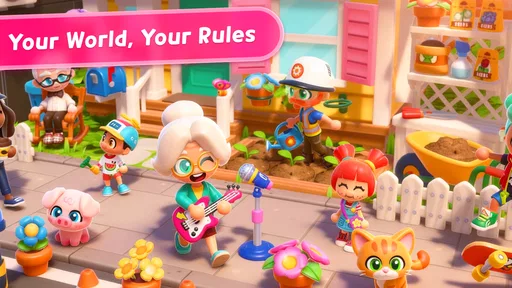
Our Review of Stories Life: Kids World Game
 Analysis by Appyee
I approached Stories Life: Kids World Game as a small roleplay playground rather than a traditional lesson-based game. That distinction matters. There are no points to chase in the usual way, no difficult level sequence pushing the player forward, and no single correct story waiting at the end. Instead, the appeal comes from choosing a character, arranging a home or city scene, acting out a simple idea, and then starting over with a different one. For children who enjoy making up situations, that open-ended rhythm can be more inviting than a worksheet-style educational game.
The game is free to start, rated for Everyone, and developed by SUBARA. It sits in the educational category, although I would describe its learning value as informal: it encourages language, sequencing, pretend play, and everyday decision-making through roleplay. Its average rating is 4.6 from around 1.2 thousand ratings, and it has passed 50 thousand installs. Those figures suggest that the concept has found an audience, but they do not replace trying it with the right expectations. This is best understood as a creative children’s world, not a structured curriculum.
How the play loop feels from the first action to the next story
I find the best way to judge this loop is to notice how a child moves from a simple idea to a scene they can explain. That shift can reveal whether the open-ended format is inviting or needs a little adult guidance. Next, I’d look at the practical checks that can make a first session smoother without mistaking setup issues for a lack of interest.
The first action is choosing what kind of day to create
The most important design choice is that the child can begin with an intention instead of a level number. One session might start with the idea of creating a home routine, while another might focus on moving around the city or inventing a short family scene. I like this because it gives the player a reason to act immediately. The game does not need a long explanation before the child can begin experimenting with the world.
That freedom also changes how an adult should introduce it. Rather than asking, “What is the objective?” I would ask, “What story are you making?” A child can decide that a character is getting ready, visiting somewhere, spending time at home, or simply exploring. The answer becomes a loose plan, and the controls or scene choices become tools for carrying it out. For younger players, that is often easier to understand than a menu full of abstract game goals.
The first useful tip is to give the player a tiny prompt before handing over the device. Try “make a morning at home,” “create a visit to the city,” or “show what happens before bedtime.” A prompt like this prevents the open world from feeling empty without taking away the child’s control. It also turns a few minutes of tapping into a small storytelling exercise.
Because the experience is designed around avatars, homes, city spaces, and mini stories, the child’s first action is usually connected to arranging people and places rather than solving a puzzle. That makes it approachable for players who may not yet enjoy reading-heavy games. It also means that the quality of a session depends heavily on imagination. A child who likes pretend play can find plenty to do; a child who expects constant instructions may wonder what to press next.
Feedback comes from visible changes, not a score screen
The feedback rhythm is quieter than in an arcade game. The player acts, sees the scene change, and decides whether that change is interesting enough to continue. In my experience, that creates a slower loop: choose an avatar or setting, perform an action, observe the result, then add another action to the same little story. The satisfaction comes from making the imagined situation look more complete.
This is where the game’s educational character is most convincing. Children are practicing cause and effect in a very accessible form. If a character is placed in a particular setting, the player can build a reason for being there. If the scene is changed, the story changes with it. The game does not have to announce a lesson for the child to work on ordering events, naming objects, assigning roles, and explaining what is happening.
For parents, the feedback is also useful as a conversation starter. Instead of interrupting to correct the story, ask the child why a character is in that place or what should happen next. That question encourages planning and vocabulary while leaving the child in charge. I found this more productive than treating the game as a silent distraction, especially when the child is willing to narrate the scene aloud.
There is a trade-off here. Open-ended feedback can feel rewarding to an imaginative player, but it may feel weak to someone who wants a clear response after every tap. A conventional educational game might say whether an answer is right and immediately offer the next challenge. Stories Life takes the opposite approach: it lets the child decide whether the result works for the story. That is a strength for creativity and a limitation for measurable practice.
The reward is a finished mini story, not a high score
The reward structure is best understood as completion through expression. A child begins with a loose idea, adds characters and places, and eventually reaches a point where the scene feels like a short episode. The reward is the feeling that “I made this,” rather than a badge or ranking that proves performance. That can be especially valuable for children who become discouraged by competitive systems.
I would use this game when the goal is to fill a short waiting period with constructive play, or when a child needs a gentle activity after a more demanding school task. It works well as a creative reset because there is no pressure to perform perfectly. A child can make a simple story in a few minutes, then explain it to a parent, sibling, or friend. The activity becomes more meaningful when the finished scene is treated as something to share.
A less obvious strength is that the same scene can support different levels of participation. A younger child may simply move avatars around and name what they see. An older child can create a sequence with a beginning, a problem, and an ending. An adult can add a language challenge, such as asking the child to describe the setting using location words or explain why a character moved. The game itself remains the same, but the conversation around it can make the activity richer.
That flexibility does not mean every session will feel equally rewarding. If the child is looking for unlocks, competition, or a strong sense of progression, the creative reward may not be enough. The in-app purchase range is from $2.99 to $11.99 per item, so families should also treat the free entry point as a chance to evaluate the experience before considering any optional spending. I would involve an adult in that decision, particularly because the game is aimed at children.
A practical everyday scenario: turning ten quiet minutes into a story
Imagine a child waiting while a parent finishes a phone call. I would suggest a simple challenge: create a short city visit with one character arriving, doing something, and returning home. The child can choose the people and places that fit the idea, act out the visit, and then explain the order of events. The parent can check in afterward and ask what happened first, what changed, and how the story ended.
This scenario shows why the game can be more useful than an ordinary video clip in certain moments. The child is not only watching a finished narrative; the child is deciding what the narrative contains. The activity can be paused when the call ends, and the story does not need to be perfect to count as successful. It is a manageable, low-pressure use case for travel, waiting rooms, or a quiet period at home.
At the same time, I would not use it as a substitute for active play, reading together, or direct conversation. The game can prompt imagination, but it cannot provide the emotional responsiveness of a parent or the physical variety of real-world play. Its best place is alongside those activities, not above them.
Resetting the session is part of the appeal
The reset is not a failure state. Once a child has finished a story, the natural next step is to change the premise and see how a different arrangement feels. A home scene can become a city scene; a familiar avatar can take on a different role; a routine can be replaced by an invented event. This is why another session can begin without needing a new reward ladder. The player returns because the same tools can produce a different result.
I think that reset works best when adults avoid asking the child to preserve every creation. The value is in trying possibilities, not in maintaining one perfect arrangement. A useful routine is to let the child make one story freely, then reset with one new rule: change the location, add a character, or make the ending different. This introduces variation without turning the game into a test.
There is also a practical limitation. Open-ended worlds can become repetitive if the player keeps using the same characters and the same type of story. When that happens, I would not assume the game has nothing left to offer. I would change the prompt or invite the child to narrate from another character’s point of view. If that still does not renew interest, it may simply be time to move to another activity. A creative sandbox should not be forced into a long session.
What it offers compared with usual children’s game alternatives
Compared with a puzzle-focused educational title, Stories Life gives up clear answers in exchange for roleplay. A puzzle game is usually better when a parent wants a defined skill exercise with an obvious result. This game is better when the aim is to encourage a child to invent, arrange, and talk through a situation. The distinction is important because downloading it with puzzle-game expectations could lead to disappointment.
Compared with a passive cartoon or video app, it gives the child more control over the order and meaning of events. The child is not limited to following someone else’s story. However, that control comes with a greater need for initiative. A video can entertain a tired child immediately, while this game may need a prompt before the child knows what kind of story to make.
Compared with a full creative building game, its appeal is more focused on everyday roleplay and small scenes. A large building sandbox may offer more complexity for children who want construction, exploration, or technical challenges. Stories Life is more approachable when the desired activity is “let’s make a little life story” rather than “let’s build an entire system.” I would choose it for quick imaginative sessions, not for a child seeking deep simulation.
The developer, SUBARA, has positioned the experience as a child-friendly world rather than an advanced game system. The Everyone content rating supports that family-oriented use, while the minimum operating system requirement of Android 7.1 makes it accessible to some older Android devices. The current version is 1.04, so I would still keep expectations grounded: this is a compact roleplay experience, not a huge platform with the breadth of a major console title.
Who will enjoy it, and who should skip it
I recommend it most for children who already enjoy dolls, toy figures, pretend households, or making up dialogue between characters. It can also suit parents looking for a gentle way to encourage storytelling without turning screen time into a formal lesson. The free starting price makes it easy to test whether the child connects with the open format before spending anything.
I would be more cautious for a child who needs explicit instructions, fast rewards, or a clear sequence of increasingly difficult tasks. The same freedom that helps an imaginative player can leave another player without direction. It is also not the right choice if the main goal is practicing a specific academic topic, memorizing facts, or measuring progress. A dedicated literacy, numeracy, or language app would be more suitable for those needs.
Parents should also decide how involved they want to be. Some children will happily invent scenes alone, while others will benefit from an adult offering the first prompt and helping them describe the result. I would start nearby, see whether the child understands the basic loop, and then choose between independent play and shared storytelling. That small adjustment makes a noticeable difference in whether the game feels purposeful or aimless.
My verdict on the action-feedback-reward-reset loop
Stories Life succeeds when it treats play as a chain of small creative decisions: choose a situation, change the world, see the scene take shape, and decide what happens next. The feedback is visual and narrative rather than numerical. The reward is ownership of a mini story. The reset works because a new prompt can turn the same world into a different kind of play.
My honest view is that this is a worthwhile free educational roleplay game for the right child, especially one who enjoys inventing everyday scenes more than completing exercises. Its limitations are equally clear: it does not replace structured learning, it may feel directionless without imagination or an adult prompt, and optional purchases mean families should make spending decisions carefully. If those trade-offs fit your needs, Stories Life: Kids World Game offers a calm, flexible way to turn a few spare minutes into child-led storytelling.
Verdict
Strengths of Stories Life: Kids World Game
- Creative storytelling encourages imagination and self-expression.
- Simple controls are suitable for younger children.
- Bright visuals and friendly characters make it inviting.
- Short activities work well for quick play sessions.
- Can provide screen time with an educational, creative focus.
Limitations of Stories Life: Kids World Game
- Some content may feel repetitive after extended play.
- Younger children may need help navigating certain menus.
- Progression can be limited without additional content.
- In-app purchases may require parental controls.
- Performance may vary on older phones and tablets.
Other Releases by SUBARA
View All
Central Hospital Stories
Educational4.5

Urban City Stories: World Game
Educational4.5

Sweet Home: Games for kids
Educational4.6
Similar Picks in This Category
View All
Little Panda Policeman
BabyBus4.0

Monster Trucks Game for Kids 2
Raz Games4.1

Little Panda's Chinese Recipes
BabyBus4.4

Little Panda's Restaurant
BabyBus4.4

Little Panda's Ice Cream Games
BabyBus4.3

Baby Panda Care
BabyBus3.8
Frequently Asked Questions
What is Stories Life: Kids World Game?
Stories Life: Kids World Game is a creative, child-friendly play experience where kids can explore colorful locations, interact with characters, and create their own everyday stories. Instead of following a strict mission structure, children can use imagination to act out routines, family moments, adventures, and simple role-playing scenarios in a relaxed virtual world.
Is Stories Life: Kids World Game suitable for children?
The game is designed primarily for young children, with simple interactions, bright visuals, and an easy-to-understand interface. However, parents should still review the recommended age rating, available content, advertisements, and any communication or purchase features before downloading. Younger children may also benefit from playing with an adult nearby, especially during their first sessions.
Does the game require an internet connection?
Some parts of Stories Life: Kids World Game may work without a constant internet connection, but online access can be necessary for downloading the game, receiving updates, loading certain content, or displaying advertisements. Availability may vary depending on the device and version installed. It is a good idea to open the game once while connected before giving it to a child offline.
Are there in-app purchases or advertisements in Stories Life: Kids World Game?
Parents should check the store listing and the game’s settings for current information about advertisements, premium items, subscriptions, or optional purchases. Children’s games sometimes offer extra locations, characters, outfits, or other content through payments. To prevent accidental purchases, enable parental controls, require authentication for transactions, and explain clearly which items can be used without spending money.
What devices are compatible with Stories Life: Kids World Game?
Compatibility depends on the operating system, device model, available storage, and the minimum software version required by the current release. Before downloading, check the official Google Play or App Store listing for the latest Android and iOS requirements. A stable connection may also be needed during installation, and keeping sufficient free storage can help the game run and update correctly.
Play our best games!


